Setting Up and Securing a Private Email Server with Postfix and Cyrus
Email is one of the most heavily monitored communication channels on the internet. Government surveillance programs, corporate data mining, and third-party email providers scanning message content for advertising have made email privacy a serious concern. Every message sent through a commercial provider passes through infrastructure you do not control, subject to logging, metadata collection, and content analysis.
In this environment, securely setting up a self-hosted email server is not just a technical exercise — it is a matter of operational security. Running your own mail infrastructure gives you full control over where your data lives, who can access it, and how it is protected in transit and at rest.
This tutorial walks through setting up a complete private email service from the command line using:
- Postfix — Mail Transfer Agent (MTA) for sending and receiving email via SMTP
- Cyrus IMAP — Mailbox server providing IMAP access to stored mail
- SASL / saslauthd — Authentication layer connecting Postfix and Cyrus
- LMTP — Local Mail Transfer Protocol for delivering mail from Postfix to Cyrus mailboxes
- Mutt — Command-line email client for reading and sending mail
- OpenVPN — VPN tunnel for secure private access to the mail server
The architecture follows this flow:
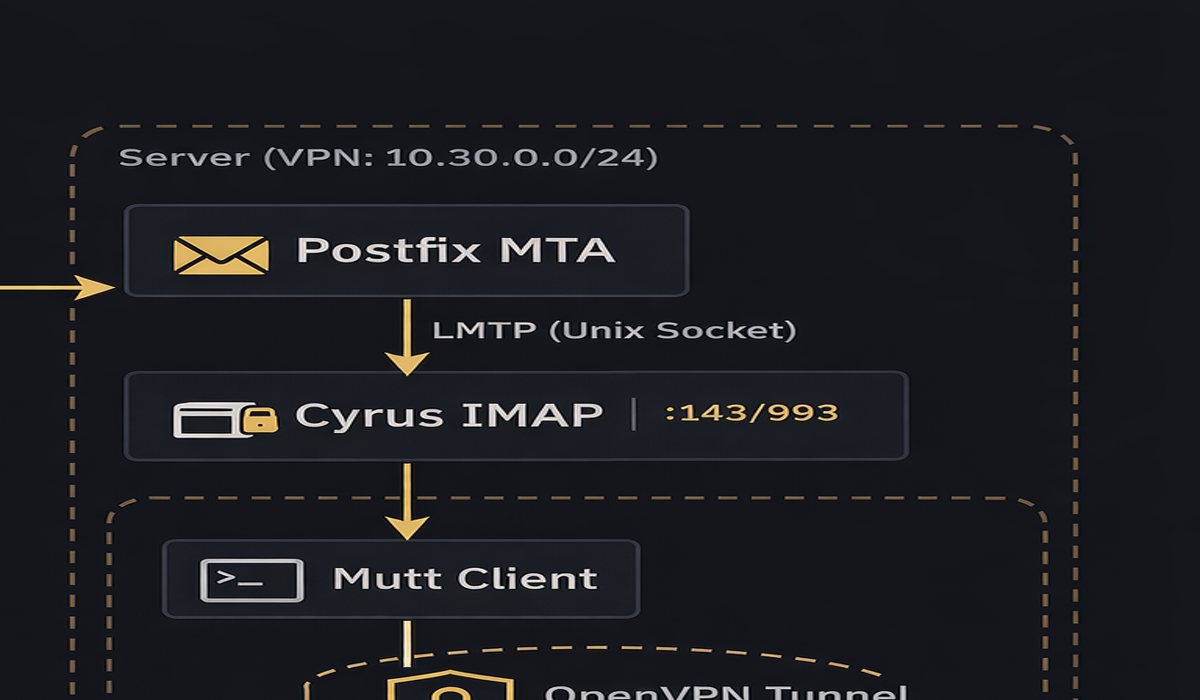
Throughout this tutorial, we use domaina.com and domainb.com as example domains. Replace these with your actual domains.
Table of Contents
- Prerequisites and Package Installation
- TLS Certificate Generation
- Postfix Configuration — main.cf
- Postfix Configuration — master.cf
- SASL Authentication Configuration
- Cyrus IMAP Configuration — imapd.conf
- Cyrus Service Configuration — cyrus.conf
- DNS and Domain Setup
- Recipient Maps and Relay Domains
- User Management
- Mutt Client Configuration
- OpenVPN Private Access
- Testing and Verification
- Troubleshooting
- Automation Scripts
Prerequisites and Package Installation
This tutorial assumes a fresh Ubuntu/Debian server with root access and a public IP address with DNS records pointing to it.
Install all required packages
sudo apt update
sudo apt install -y \
  postfix \
  cyrus-imapd \
  cyrus-admin \
  cyrus-clients \
  sasl2-bin \
  libsasl2-modules \
  mutt \
  openvpn \
  easy-rsa \
  openssl \
  mailutils
During the Postfix installation, select "Internet Site" when prompted and enter your primary domain hostname (e.g., smtp.domaina.com).
Verify services are installed
postconf mail_version
cyrus -v 2>&1 | head -1
saslauthd -v 2>&1 | head -1
mutt -v | head -1
openvpn --version | head -1
Verify listening ports
ss -nlpt | grep -E '(25|143|587|993)'
At this stage, Postfix should be listening on port 25 and Cyrus on ports 143 (IMAP) and 993 (IMAPS).
TLS Certificate Generation
TLS encrypts SMTP and IMAP connections. We generate a self-signed certificate for the mail server. For production, replace this with a certificate from Let's Encrypt or another CA.
Generate a self-signed certificate and private key
sudo openssl req -new -x509 -days 365 -nodes -newkey rsa:2048 \
  -keyout /etc/ssl/private/mail-server.key \
  -out /etc/ssl/certs/mail-server.crt \
  -subj "/C=US/ST=California/L=YourCity/O=YourOrg/CN=smtp.domaina.com"
| Flag | Purpose |
|---|---|
-new -x509 |
Generate a new self-signed certificate (not a CSR) |
-days 365 |
Certificate validity period |
-nodes |
Do not encrypt the private key with a passphrase (required for automated service startup) |
-newkey rsa:2048 |
Generate a new 2048-bit RSA key pair |
-keyout |
Path to write the private key |
-out |
Path to write the certificate |
-subj |
Certificate subject fields — CN must match your mail hostname |
Generate a combined PEM for Cyrus
Cyrus IMAP expects both the certificate and key in a single PEM file:
sudo cat /etc/ssl/certs/mail-server.crt /etc/ssl/private/mail-server.key \
  > /etc/ssl/private/server.pem
Set proper permissions
sudo chmod 640 /etc/ssl/private/mail-server.key
sudo chmod 640 /etc/ssl/private/server.pem
sudo chown root:ssl-cert /etc/ssl/private/mail-server.key
sudo chown root:ssl-cert /etc/ssl/private/server.pem
The private key must be readable by the ssl-cert group (which Postfix and Cyrus processes belong to) but not world-readable.
Reference: OpenSSL req manual
Postfix Configuration — main.cf
The main Postfix configuration file is /etc/postfix/main.cf. Below is the complete configuration with every non-default setting explained.
Back up the original first
sudo cp /etc/postfix/main.cf /etc/postfix/main.cf.bak
Write the configuration
sudo tee /etc/postfix/main.cf > /dev/null << 'EOF'
# See /usr/share/postfix/main.cf.dist for a commented, more complete version

# ============================================================
# BASIC SETTINGS
# ============================================================

# Banner shown to connecting SMTP clients. Customized to not reveal
# software version information (security best practice).
# Default: $myhostname ESMTP $mail_name
smtpd_banner = $myhostname ESMTP

# Disable biff (local mail notification). Not needed on a server.
# Default: yes
biff = no

# Do not append .domain to locally submitted mail. This is the
# responsibility of the Mail User Agent (MUA), not the MTA.
# Default: yes
append_dot_mydomain = no

# Use Postfix 3.6 compatibility defaults.
compatibility_level = 3.6

# ============================================================
# HOSTNAME AND DOMAIN
# ============================================================

# The hostname that Postfix uses to identify itself to other mail
# servers in SMTP HELO/EHLO. Must match your DNS MX record.
# Default: system hostname
myhostname = smtp.domaina.com

# List of domains this server considers itself the final destination
# for. Mail addressed to these domains will be delivered locally
# (via Cyrus LMTP) rather than forwarded.
# Default: $myhostname, localhost.$mydomain, localhost
mydestination = smtp.domaina.com, domaina.com, domainb.com, localhost.localdomain, localhost

# IP networks that are considered "trusted" — mail from these
# networks is relayed without authentication. Only loopback here.
# Default: depends on system
mynetworks = 127.0.0.0/8 [::ffff:127.0.0.0]/104 [::1]/128

# Listen on all network interfaces for incoming mail.
# Default: all
inet_interfaces = all

# Support both IPv4 and IPv6.
# Default: all
inet_protocols = all

# No limit on mailbox size (Cyrus manages quotas).
# Default: 51200000 (about 50MB)
mailbox_size_limit = 0

# Use '+' as the delimiter for sub-addressing (user+tag@domain).
# Default: none
recipient_delimiter = +

# Alias maps for local delivery lookups.
# Default: hash:/etc/aliases
alias_maps = hash:/etc/aliases
alias_database = hash:/etc/aliases

# Do not relay mail — empty relayhost means direct delivery.
# Default: (empty)
relayhost =

# ============================================================
# TLS — OUTGOING CONNECTIONS (smtp_*)
# ============================================================
# These settings control TLS when Postfix connects to OTHER servers
# to deliver outbound mail.

# Enable TLS for outgoing SMTP connections.
# Default: no
smtp_use_tls = yes

# Certificate and key for outgoing TLS connections.
smtp_tls_cert_file = /etc/ssl/certs/mail-server.crt
smtp_tls_key_file = /etc/ssl/private/mail-server.key

# Path to directory containing trusted CA certificates.
smtp_tls_CApath = /etc/ssl/certs

# Cache TLS sessions for faster reconnection to the same servers.
smtp_tls_session_cache_database = btree:${data_directory}/smtp_scache

# Opportunistic TLS — encrypt if the remote server supports it,
# but do not reject if it does not. Use "encrypt" to force TLS.
# Default: none
smtp_tls_security_level = may

# ============================================================
# TLS — INCOMING CONNECTIONS (smtpd_*)
# ============================================================
# These settings control TLS when OTHER servers or clients connect
# to this Postfix instance.

# Enable TLS for incoming SMTP connections.
# Default: no
smtpd_use_tls = yes

# Certificate and key presented to connecting clients.
smtpd_tls_cert_file = /etc/ssl/certs/mail-server.crt
smtpd_tls_key_file = /etc/ssl/private/mail-server.key

# Add a Received: header showing TLS protocol/cipher used.
# Useful for verifying encryption is working.
# Default: no
smtpd_tls_received_header = yes

# TLS log level: 0=disabled, 1=summary, 2=negotiation, 3=hex dump.
# Use 1 for production, 3 for debugging.
# Default: 0
smtpd_tls_loglevel = 1

# Do NOT require TLS for authentication (set to "yes" in production
# once TLS is confirmed working to prevent plaintext password leaks).
# Default: no
smtpd_tls_auth_only = no

# ============================================================
# CYRUS IMAP DELIVERY VIA LMTP
# ============================================================
# Instead of delivering to local mailboxes (Maildir/mbox), Postfix
# hands mail to Cyrus IMAP via LMTP over a Unix domain socket.

# Route all local mail delivery through Cyrus LMTP.
# The socket path must match lmtpsocket in Cyrus imapd.conf.
# Default: (not set — uses local delivery agent)
mailbox_transport = lmtp:unix:/var/run/cyrus/socket/lmtp

# Per-domain transport overrides. Maps domains to LMTP delivery.
# Default: (not set)
transport_maps = hash:/etc/postfix/relay_domains

# Only accept mail for recipients listed in this map file.
# Rejects mail to unknown users at SMTP time (prevents backscatter).
# Default: proxy:unix:passwd.byname $alias_maps
local_recipient_maps = hash:/etc/postfix/local_maps

# ============================================================
# SASL AUTHENTICATION
# ============================================================
# SASL allows remote clients (like Mutt or Thunderbird) to
# authenticate with a username/password before sending mail.
# Without this, only clients on mynetworks can send.

# Enable SASL authentication for incoming SMTP connections.
# Default: no
smtpd_sasl_auth_enable = yes

# Disallow authentication methods that permit anonymous login.
# Default: noanonymous
smtpd_sasl_security_options = noanonymous

# Use the Cyrus SASL library (as opposed to Dovecot SASL).
# Default: cyrus
smtpd_sasl_type = cyrus

# The domain appended to unqualified usernames during SASL auth.
# Must match the loginrealms in Cyrus imapd.conf.
# Default: (empty)
smtpd_sasl_local_domain = $myhostname

# Add an authentication header to messages showing who authenticated.
# Useful for auditing.
# Default: no
smtpd_sasl_authenticated_header = yes

# Path where Postfix looks for the SASL smtpd.conf file.
# Default: /etc/postfix/sasl:/usr/lib/sasl2
smtpd_sasl_path = /etc/postfix/sasl:/usr/lib/sasl2

# Support broken SMTP clients that use a non-standard AUTH syntax
# (some older Outlook versions). Harmless to enable.
# Default: no
broken_sasl_auth_clients = yes

# ============================================================
# RELAY RESTRICTIONS
# ============================================================
# Controls who is allowed to send mail through this server.

# First allow authenticated users and trusted networks, then
# reject everything else. This prevents being an open relay.
# Default: permit_mynetworks, permit_sasl_authenticated, defer_unauth_destination
smtpd_relay_restrictions = permit_mynetworks permit_sasl_authenticated defer_unauth_destination

# Additional recipient restrictions — same logic as relay but
# applied at RCPT TO stage.
smtpd_recipient_restrictions =
    permit_sasl_authenticated,
    permit_mynetworks,
    reject_unauth_destination
EOF
Key settings explained
| Setting | What it does | Why it matters |
|---|---|---|
smtpd_sasl_auth_enable = yes |
Allows clients to authenticate via username/password | Without this, only LAN clients can send mail |
smtpd_sasl_type = cyrus |
Uses Cyrus SASL library for auth | Integrates with sasldb2 password database |
smtpd_sasl_local_domain = $myhostname |
Sets the SASL authentication realm | Must match Cyrus loginrealms or auth fails |
mailbox_transport = lmtp:unix:... |
Routes all mail to Cyrus via LMTP | Connects Postfix delivery to Cyrus mailboxes |
local_recipient_maps = hash:... |
Only accepts mail for known recipients | Prevents backscatter to non-existent users |
smtpd_tls_auth_only = no |
Allow auth without TLS (set yes in production) |
Prevents plaintext credential exposure |
Reference: Postfix Configuration Parameters
Postfix Configuration — master.cf
The master.cf file defines what Postfix services run and how. This is where you enable the submission port (587) and configure Cyrus pipe delivery.
Back up and write the configuration
sudo cp /etc/postfix/master.cf /etc/postfix/master.cf.bak
Edit /etc/postfix/master.cf. The critical lines are:
sudo tee /etc/postfix/master.cf > /dev/null << 'EOF'
#
# Postfix master process configuration file.
# See master(5) for format details.
#
# ==========================================================================
# service type  private unpriv  chroot  wakeup  maxproc command + args
#               (yes)   (yes)   (no)    (never) (100)
# ==========================================================================

# IMPORTANT: chroot is set to "n" (no) for SMTP services.
# This is required so Postfix can access the Cyrus LMTP socket
# and the SASL authentication socket, which live outside the
# chroot directory (/var/spool/postfix).
# Default chroot is "y" on Debian — we override it here.
smtp      inet  n       -       n       -       -       smtpd

# Submission port (587) — for authenticated client mail submission.
# This is the port your MUA (Mutt, Thunderbird) connects to for
# sending mail. It inherits SASL settings from main.cf.
# Default: commented out
submission inet n       -       n       -       -       smtpd

# Internal Postfix services — leave chroot as default
pickup    unix  n       -       y       60      1       pickup
cleanup   unix  n       -       y       -       0       cleanup
qmgr      unix  n       -       n       300     1       qmgr
tlsmgr    unix  -       -       y       1000?   1       tlsmgr
rewrite   unix  -       -       y       -       -       trivial-rewrite
bounce    unix  -       -       y       -       0       bounce
defer     unix  -       -       y       -       0       bounce
trace     unix  -       -       y       -       0       bounce
verify    unix  -       -       y       -       1       verify
flush     unix  n       -       y       1000?   0       flush
proxymap  unix  -       -       n       -       -       proxymap
proxywrite unix -       -       n       -       1       proxymap
smtp      unix  -       -       y       -       -       smtp
relay     unix  -       -       y       -       -       smtp
        -o syslog_name=postfix/$service_name
showq     unix  n       -       y       -       -       showq
error     unix  -       -       y       -       -       error
retry     unix  -       -       y       -       -       error
discard   unix  -       -       y       -       -       discard

# Local delivery — non-chroot so it can access local resources.
local     unix  -       n       n       -       -       local
virtual   unix  -       n       n       -       -       virtual

# LMTP client — delivers to Cyrus IMAP via the LMTP socket.
# Non-chroot is required to reach /var/run/cyrus/socket/lmtp.
lmtp      unix  -       -       n       -       -       lmtp

anvil     unix  -       -       y       -       1       anvil
scache    unix  -       -       y       -       1       scache
postlog   unix-dgram n  -       n       -       1       postlogd

# Cyrus delivery via pipe transport (alternative to LMTP).
# Used when transport_maps routes a domain through the cyrus transport.
cyrus     unix  -       n       n       -       -       pipe
  flags=DRX user=cyrus argv=/usr/sbin/cyrdeliver -e -r ${sender} -m ${extension} ${user}

uucp      unix  -       n       n       -       -       pipe
  flags=Fqhu user=uucp argv=uux -r -n -z -a$sender - $nexthop!rmail ($recipient)
EOF
Key differences from defaults
| Change | Default | Our Value | Why |
|---|---|---|---|
| smtp chroot | y |
n |
Must access LMTP socket and SASL outside chroot |
| submission | commented out | enabled | Allows client mail submission on port 587 |
| local chroot | y |
n |
Access to local resources for delivery |
| lmtp chroot | y |
n |
Reach Cyrus LMTP socket at /var/run/cyrus/socket/lmtp |
| cyrus pipe | not present | added | Alternative Cyrus delivery transport |
Reference: Postfix master.cf
SASL Authentication Configuration
SASL (Simple Authentication and Security Layer) connects Postfix and Cyrus to a shared password database. There are two SASL mechanisms:
- auxprop — SASL reads passwords directly from a database file (
/etc/sasldb2). No daemon needed. The SASL library does lookups itself. - saslauthd — A daemon that handles authentication requests, supporting PAM, LDAP, Kerberos, or sasldb backends.
This tutorial uses auxprop with sasldb for simplicity — passwords are stored in /etc/sasldb2 and both Postfix and Cyrus read from it directly.
Configure SASL for Postfix SMTP
Create the SASL configuration file that Postfix reads when authenticating SMTP clients:
sudo mkdir -p /etc/postfix/sasl
sudo tee /etc/postfix/sasl/smtpd.conf > /dev/null << 'EOF'
# SASL configuration for Postfix SMTP daemon
# This file tells Postfix how to verify passwords when a client
# authenticates via SMTP AUTH.

# Authentication mechanisms to offer to clients.
# PLAIN: sends credentials in base64 (safe over TLS).
# LOGIN: legacy mechanism for older clients.
# Default: all available mechanisms
mech_list: PLAIN LOGIN

# Use auxprop to look up passwords directly from sasldb2.
# Alternative: "saslauthd" to delegate to the saslauthd daemon.
# Default: auxprop
pwcheck_method: auxprop

# Which auxprop plugin to use for password lookups.
# "sasldb" reads from /etc/sasldb2.
# Default: all available plugins (which may cause conflicts)
auxprop_plugin: sasldb

# Enable plaintext authentication.
# Default: no (but required for PLAIN/LOGIN mechanisms)
allow_plaintext: true

# Logging level: 0=none, 7=maximum debug.
# Use 7 for troubleshooting, 0 for production.
# Default: 0
log_level: 3
EOF
Configure saslauthd (backup authentication method)
Even though we use auxprop as the primary method, configure saslauthd as a fallback and for testing with testsaslauthd:
sudo tee /etc/default/saslauthd > /dev/null << 'EOF'
# Enable the saslauthd daemon.
# Default: no
START=yes

# Description for systemd service display.
DESC="SASL Authentication Daemon"

# Short name for the service instance.
NAME="saslauthd"

# Authentication mechanism backend.
# "sasldb" — authenticate against /etc/sasldb2 (matches our auxprop setup).
# "pam" — authenticate against system accounts via PAM.
# "shadow" — authenticate against /etc/shadow directly.
# Default: pam
MECHANISMS="sasldb"

# Number of worker threads to handle auth requests.
# Default: 5
THREADS=5

# Runtime options:
# -c  — enable credential caching for faster repeated lookups.
# -m  — path to the saslauthd communication socket directory.
#
# IMPORTANT: If Postfix runs chrooted, use:
#   OPTIONS="-c -m /var/spool/postfix/var/run/saslauthd"
# Since our Postfix is NOT chrooted (see master.cf), we use the
# standard path:
# Default: -c -m /var/run/saslauthd
OPTIONS="-c -m /var/run/saslauthd"
EOF
Set permissions on sasldb2
The SASL database must be readable by both Postfix and Cyrus:
# Create the database if it does not exist
sudo touch /etc/sasldb2

# Set ownership and permissions
sudo chown root:sasl /etc/sasldb2
sudo chmod 660 /etc/sasldb2

# Add postfix user to the sasl group so it can read the database
sudo usermod -aG sasl postfix
Start and enable saslauthd
sudo systemctl enable saslauthd
sudo systemctl restart saslauthd
sudo systemctl status saslauthd
Reference: Cyrus SASL documentation
Cyrus IMAP Configuration — imapd.conf
The Cyrus IMAP configuration file /etc/imapd.conf controls the mailbox server. Every non-default setting is explained below.
Back up and write the configuration
sudo cp /etc/imapd.conf /etc/imapd.conf.bak
sudo tee /etc/imapd.conf > /dev/null << 'EOF'
# Cyrus IMAP server configuration
# Reference: https://www.cyrusimap.org/imap/reference/manpages/configs/imapd.conf.html

# ============================================================
# DIRECTORY PATHS
# ============================================================

# Root directory for Cyrus configuration data (mailbox databases,
# annotations, seen state, etc.).
# Default: /var/lib/cyrus
configdirectory: /var/lib/cyrus

# Process and lock file directories.
# Default: /run/cyrus/proc, /run/cyrus/lock
proc_path: /run/cyrus/proc
mboxname_lockpath: /run/cyrus/lock

# ============================================================
# MAIL STORAGE
# ============================================================

# Default partition for new mailboxes. The name "default" is
# referenced by partition-default below.
# Default: default
defaultpartition: default

# Filesystem path where mail for the "default" partition is stored.
# Default: /var/spool/cyrus/mail
partition-default: /var/spool/cyrus/mail

# Hash the partition spool directory. Spreads mailboxes across
# subdirectories (a-z) to avoid filesystem performance issues
# with many mailboxes in a single directory.
# Default: false
hashimapspool: true

# ============================================================
# NAMESPACE
# ============================================================

# Use the traditional Cyrus namespace where subfolders appear
# under INBOX (e.g., INBOX.Sent, INBOX.Drafts).
# Set to "yes" for flat namespace (Sent, Drafts at same level as INBOX).
# Default: no
altnamespace: no

# Use dots as hierarchy separator (Cyrus default) rather than
# forward slashes (UNIX convention).
# Default: no
unixhierarchysep: no

# ============================================================
# ADMIN USERS
# ============================================================

# Space-separated list of users with full admin rights across
# all Cyrus services. The "cyrus" user is the system admin account.
# Default: (none)
admins: cyrus

# Additional users with IMAP admin rights specifically.
# Default: (none)
imap_admins: cyrus

# ============================================================
# AUTHENTICATION AND LOGIN
# ============================================================

# Disable anonymous IMAP logins. All users must authenticate.
# Default: no
allowanonymouslogin: no

# Allow plaintext passwords over non-TLS connections.
# Set to "no" in production once TLS is confirmed working.
# Default: yes
allowplaintext: yes

# SASL mechanisms the server will accept for authentication.
# PLAIN: Base64-encoded username/password (standard, safe over TLS).
# LOGIN: Legacy mechanism for older clients.
# Default: all available mechanisms
sasl_mech_list: PLAIN LOGIN

# How Cyrus verifies passwords. "auxprop" looks up passwords
# directly from a database (sasldb2) without a daemon.
# Alternative: "saslauthd" to delegate to the saslauthd daemon.
# Default: auxprop
sasl_pwcheck_method: auxprop

# Which auxprop plugin to use. "sasldb" reads /etc/sasldb2.
# Default: (all available — can cause conflicts)
sasl_auxprop_plugin: sasldb

# Automatically create hashed password entries when a plaintext
# password is verified. Helps with migration scenarios.
# Default: no
sasl_auto_transition: yes

# ============================================================
# VIRTUAL DOMAINS
# ============================================================

# Enable virtual domain support. User's domain is determined by
# splitting the userid at the last '@'. Required for hosting
# multiple domains (domaina.com, domainb.com) on one server.
# Default: off
virtdomains: yes

# The default domain assigned to users who log in without
# specifying a domain (e.g., "user" instead of "user@domaina.com").
# Default: (none)
defaultdomain: domaina.com

# Space-separated list of domains whose users may log in.
# Cross-realm identities (user@domain) require the domain to be
# listed here. List ALL virtual domains you host.
# Default: (none)
loginrealms: domaina.com domainb.com localhost

# ============================================================
# LMTP DELIVERY
# ============================================================

# Force recipient addresses to lowercase during LMTP delivery.
# Cyrus is case-sensitive — this prevents "User" and "user" from
# being treated as different mailboxes.
# Default: yes (per RFC 2821)
lmtp_downcase_rcpt: yes

# Unix domain socket where the LMTP daemon listens for mail
# from Postfix. Must match mailbox_transport in Postfix main.cf.
# Default: /run/cyrus/socket/lmtp
lmtpsocket: /run/cyrus/socket/lmtp

# ============================================================
# POP3
# ============================================================

# Minimum interval between POP3 mail fetches (in minutes).
# Prevents clients from hammering the server.
# Default: 0 (no limit)
popminpoll: 1

# ============================================================
# QUOTAS
# ============================================================

# If nonzero, allow users to auto-create their INBOX.
# Set to 0 to require admin to create mailboxes manually.
# A positive value sets the default quota in KB.
# Default: 0
autocreate_quota: 0

# ============================================================
# PERMISSIONS
# ============================================================

# umask for files created by Cyrus processes.
# 077 = owner read/write only (most restrictive).
# Default: 077
umask: 077

# ============================================================
# SIEVE MAIL FILTERING
# ============================================================

# Do not look for Sieve scripts in user home directories.
# Default: false
sieveusehomedir: false

# Directory where Sieve scripts are stored.
# Default: /var/spool/sieve
sievedir: /var/spool/sieve

# ============================================================
# HTTP MODULES (CalDAV, CardDAV)
# ============================================================

# Enable CalDAV and CardDAV if you want calendar/contact sync.
# Default: (none)
httpmodules: caldav carddav

# ============================================================
# TLS/SSL
# ============================================================

# Combined certificate + key file used for ALL Cyrus TLS services
# (IMAP, POP3, LMTP, Sieve).
# Default: (none — TLS disabled)
tls_server_cert: /etc/ssl/private/server.pem
tls_server_key: /etc/ssl/private/server.pem

# Directory containing trusted CA certificates for client
# certificate verification.
# Default: (none)
tls_client_ca_dir: /etc/ssl/certs

# Cache TLS sessions for 24 hours (1440 minutes) for faster
# reconnection by repeat clients.
# Default: 1440
tls_session_timeout: 1440

# ============================================================
# SOCKETS (must match cyrus.conf)
# ============================================================

# Unix socket for the idle notification daemon.
idlesocket: /run/cyrus/socket/idle

# Unix socket for the new mail notification daemon.
notifysocket: /run/cyrus/socket/notify

# ============================================================
# LOGGING
# ============================================================

# Syslog prefix for all Cyrus log messages.
# Messages appear as cyrus/imap, cyrus/lmtp, etc.
# Default: cyrus
syslog_prefix: cyrus
EOF
Reference: Cyrus imapd.conf manual
Cyrus Service Configuration — cyrus.conf
The cyrus.conf file defines which Cyrus daemons to run. It has three sections: START (run once at startup), SERVICES (persistent daemons), and EVENTS (periodic tasks).
sudo cp /etc/cyrus.conf /etc/cyrus.conf.bak
sudo tee /etc/cyrus.conf > /dev/null << 'EOF'
# Cyrus IMAP service configuration
# Reference: https://www.cyrusimap.org/imap/reference/manpages/configs/cyrus.conf.html

START {
    # Recover the mailbox database on startup. Required — do not remove.
    recover     cmd="/usr/sbin/cyrus ctl_cyrusdb -r"

    # Start the idle notification daemon (for IMAP IDLE push support).
    # Only needed if idlemethod is set to "idled" in imapd.conf.
    idled       cmd="idled"

    # Prune duplicate delivery suppression database entries older than
    # 3 days on startup.
    delprune    cmd="/usr/sbin/cyrus expire -E 3"

    # Prune expired TLS session cache entries on startup.
    tlsprune    cmd="/usr/sbin/cyrus tls_prune"
}

SERVICES {
    # ---- IMAP ----
    # Standard IMAP on port 143 (STARTTLS upgrade available).
    # -U 30: reuse each process for up to 30 connections before respawning.
    # maxchild=100: limit concurrent IMAP connections.
    imap        cmd="imapd -U 30" listen="imap" prefork=0 maxchild=100

    # IMAP over TLS (IMAPS) on port 993. The -s flag enables TLS wrapping.
    imaps       cmd="imapd -s -U 30" listen="imaps" prefork=0 maxchild=100

    # ---- LMTP ----
    # Local Mail Transfer Protocol — receives mail from Postfix.
    # Listens on a Unix domain socket (not TCP) for security.
    # The socket path MUST match lmtpsocket in imapd.conf and
    # mailbox_transport in Postfix main.cf.
    lmtpunix    cmd="lmtpd" listen="/var/run/cyrus/socket/lmtp" prefork=0 maxchild=20

    # ---- SIEVE ----
    # ManageSieve protocol for remote Sieve script management.
    # Restricted to localhost by default.
    sieve       cmd="timsieved" listen="localhost:sieve" prefork=0 maxchild=100

    # ---- NOTIFICATIONS ----
    notify      cmd="notifyd" listen="/run/cyrus/socket/notify" proto="udp" prefork=1
}

EVENTS {
    # Checkpoint the mailbox database every 30 minutes. Required.
    checkpoint  cmd="/usr/sbin/cyrus ctl_cyrusdb -c" period=30

    # Prune duplicate delivery database daily at 04:01.
    delprune    cmd="/usr/sbin/cyrus expire -E 3" at=0401

    # Prune expired TLS sessions daily at 04:01.
    tlsprune    cmd="/usr/sbin/cyrus tls_prune" at=0401

    # Delete expunged messages and expired data older than 28 days.
    deleteprune   cmd="/usr/sbin/cyrus expire -E 4 -D 28" at=0430
    expungeprune  cmd="/usr/sbin/cyrus expire -E 4 -X 28" at=0445
}
EOF
Key services explained
| Service | Port/Socket | Purpose |
|---|---|---|
imap |
TCP 143 | Standard IMAP with optional STARTTLS |
imaps |
TCP 993 | IMAP wrapped in TLS from connection start |
lmtpunix |
Unix socket | Receives mail from Postfix for delivery to mailboxes |
sieve |
TCP 4190 (localhost) | Sieve filter script management |
notify |
Unix socket (UDP) | Internal new-mail notification |
Reference: Cyrus cyrus.conf manual
DNS and Domain Setup
For mail to work, your DNS must have proper MX records pointing to your server.
Required DNS records
Set these at your DNS provider (e.g., Cloudflare, Route53, DigitalOcean):
# A record — points your mail hostname to your server IP
smtp.domaina.com.    IN  A      YOUR.SERVER.IP

# MX records — tells other servers where to deliver mail for your domains
domaina.com.         IN  MX  10  smtp.domaina.com.
domainb.com.         IN  MX  10  smtp.domaina.com.

# SPF record — declares your server is authorized to send mail for these domains
domaina.com.         IN  TXT    "v=spf1 ip4:YOUR.SERVER.IP -all"
domainb.com.         IN  TXT    "v=spf1 ip4:YOUR.SERVER.IP -all"

# Reverse DNS (PTR) — set via your hosting provider's control panel
YOUR.SERVER.IP       IN  PTR    smtp.domaina.com.
Verify DNS
# Check MX records
dig domaina.com MX +short
dig domainb.com MX +short

# Check A record
dig smtp.domaina.com A +short

# Check SPF
dig domaina.com TXT +short
Recipient Maps and Relay Domains
Postfix needs to know which users exist (to reject mail for unknown recipients) and which domains to route through Cyrus LMTP.
Create the relay domains map
This tells Postfix to deliver mail for these domains via the Cyrus LMTP socket:
sudo tee /etc/postfix/relay_domains > /dev/null << 'EOF'
domaina.com lmtp:unix:/var/run/cyrus/socket/lmtp
domainb.com lmtp:unix:/var/run/cyrus/socket/lmtp
EOF

# Compile the hash database
sudo postmap /etc/postfix/relay_domains
Create the local recipient maps
This file maps local usernames to their full email addresses. Postfix rejects mail at SMTP time for any recipient not listed here:
sudo tee /etc/postfix/local_maps > /dev/null << 'EOF'
admin admin@domaina.com
postmaster postmaster@domaina.com
EOF

# Compile the hash database
sudo postmap /etc/postfix/local_maps
You will add more entries as you create users (see the User Management section).
User Management
Creating a new email user requires three steps:
- SASL — Add the user to the SASL password database so they can authenticate
- Cyrus — Create the IMAP mailbox so they have a place to store mail
- Postfix — Add the user to local_maps so Postfix accepts mail for them
Step 1: Create the Cyrus admin password (one-time setup)
The cyrus admin user is needed to create mailboxes:
# Set a password for the cyrus admin user in sasldb2
sudo saslpasswd2 -c cyrus
# Enter a strong password when prompted
Step 2: Create a new email user
Here is the complete process for creating user alice on domaina.com:
# === SASL: Create authentication credentials ===
# The -c flag creates the user. The -p flag reads password from stdin.
# Without -p, it prompts interactively.
echo "alicepassword" | sudo saslpasswd2 -c alice -p

# Verify the user was created in sasldb2
sudo sasldblistusers2 | grep alice

# === CYRUS: Create the IMAP mailbox ===
# Connect to Cyrus admin console
cyradm --auth login localhost --user cyrus
# At the cyradm prompt, create the mailbox:
#   cm user.alice@domaina.com
# Then quit:
#   quit

# Non-interactive alternative using expect or direct command:
echo 'cm user.alice@domaina.com' | cyradm --auth login localhost --user cyrus

# === POSTFIX: Add to recipient maps ===
echo "alice alice@domaina.com" | sudo tee -a /etc/postfix/local_maps
sudo postmap /etc/postfix/local_maps
Step 3: Test the new user
# Test SASL authentication
testsaslauthd -u alice -p alicepassword

# Test with realm (domain)
testsaslauthd -u alice -p alicepassword -r domaina.com

# Expected output: 0: OK "Success."
Creating a user on a second domain
For user bob on domainb.com:
echo "bobpassword" | sudo saslpasswd2 -c bob -p
echo 'cm user.bob@domainb.com' | cyradm --auth login localhost --user cyrus
echo "bob bob@domainb.com" | sudo tee -a /etc/postfix/local_maps
sudo postmap /etc/postfix/local_maps
Deleting a user
# Remove from SASL database
sudo saslpasswd2 -d alice

# Remove the Cyrus mailbox (connect to cyradm)
echo 'dm user.alice@domaina.com' | cyradm --auth login localhost --user cyrus

# Remove from local_maps (edit the file manually, then recompile)
sudo sed -i '/^alice /d' /etc/postfix/local_maps
sudo postmap /etc/postfix/local_maps
List all users
# SASL users
sudo sasldblistusers2

# Cyrus mailboxes
echo 'lm' | cyradm --auth login localhost --user cyrus
Mutt Client Configuration
Mutt is a powerful command-line email client that connects to your mail server via IMAP (reading) and SMTP (sending).
Create a muttrc file for a user
cat > ~/.muttrc << 'EOF'
# ============================================================
# IMAP Settings — reading mail from Cyrus
# ============================================================

# IMAP username (just the username, not the full email)
set imap_user = "alice"

# IMAP password
set imap_pass = "alicepassword"

# Do not force TLS (use this for self-signed certs or internal access).
# Set to "yes" in production with valid TLS certificates.
set ssl_force_tls = no

# Accept self-signed certificates without prompting
set ssl_starttls = yes
set certificate_file = ~/.mutt/certificates

# IMAP server and port (143 = plaintext/STARTTLS, 993 = IMAPS)
set folder = "imap://smtp.domaina.com:143"

# Default mailbox to open on startup
set spoolfile = "+INBOX"

# Where to save drafts
set postponed = "+Drafts"

# ============================================================
# SMTP Settings — sending mail through Postfix
# ============================================================

# SMTP server URL with authentication credentials.
# Port 587 is the submission port configured in master.cf.
set smtp_url = "smtp://alice:alicepassword@smtp.domaina.com:587/"

# SMTP password (redundant with url but some versions need it)
set smtp_pass = "alicepassword"

# ============================================================
# Identity
# ============================================================

# The From: address on outgoing mail
set from = "alice@domaina.com"

# Display name shown to recipients
set realname = "Alice"
EOF
Test Mutt
# Launch mutt — should connect to IMAP and show INBOX
mutt

# Or use a specific config file
mutt -F /path/to/alice.muttrc
Using a per-user muttrc
For managing multiple accounts, create separate config files:
# alice's config
mutt -F ~/alice.muttrc

# bob's config
mutt -F ~/bob.muttrc
Reference: Mutt manual
OpenVPN Private Access
Instead of exposing IMAP ports to the internet, use OpenVPN to create a private tunnel. Only VPN-connected clients can reach the mail server's IMAP and submission ports.
Method 1: Static Key (simple, peer-to-peer)
This is the fastest setup for a single client connecting to the server. No PKI needed.
Generate a shared secret key
openvpn --genkey secret /etc/openvpn/static.key
Server configuration
sudo tee /etc/openvpn/server-static.conf > /dev/null << 'EOF'
# Point-to-point tunnel using a pre-shared key
dev tun

# Virtual IP addresses: server=10.30.0.1, client=10.30.0.2
ifconfig 10.30.0.1 10.30.0.2

# Path to the pre-shared secret key
secret /etc/openvpn/static.key

# Keep the tunnel alive with pings every 10 seconds,
# restart if no response in 60 seconds.
keepalive 10 60

# Run as unprivileged user after startup
user nobody
group nogroup

# Persist tunnel device and key across restarts
persist-tun
persist-key

# Log verbosity: 0=silent, 3=normal, 9=debug
verb 3
EOF
Start the server
sudo openvpn --config /etc/openvpn/server-static.conf --daemon
Client configuration
Copy the static.key file securely to your client machine, then:
sudo tee /etc/openvpn/client-static.conf > /dev/null << 'EOF'
dev tun
remote YOUR.SERVER.IP
ifconfig 10.30.0.2 10.30.0.1
secret /etc/openvpn/static.key
keepalive 10 60
user nobody
group nogroup
persist-tun
persist-key
verb 3
EOF

# Connect
sudo openvpn --config /etc/openvpn/client-static.conf --daemon
Once connected, configure Mutt to use the VPN IP:
set folder = "imap://10.30.0.1:143"
set smtp_url = "smtp://alice:alicepassword@10.30.0.1:587/"
Method 2: PKI with easy-rsa (production, multi-client)
For multiple clients, use certificate-based authentication:
# Initialize the PKI
cd /etc/openvpn
make-cadir easy-rsa
cd easy-rsa

# Build the Certificate Authority
./easyrsa init-pki
./easyrsa build-ca

# Generate server certificate and key
./easyrsa gen-req mail-server nopass
./easyrsa sign-req server mail-server

# Generate Diffie-Hellman parameters
./easyrsa gen-dh

# Generate client certificates
./easyrsa gen-req client1 nopass
./easyrsa sign-req client client1

# Verify certificates
openssl verify -CAfile pki/ca.crt pki/issued/mail-server.crt
openssl verify -CAfile pki/ca.crt pki/issued/client1.crt
Firewall rules (restrict IMAP to VPN only)
Once OpenVPN is running, restrict IMAP access to only the VPN subnet:
# Allow IMAP/IMAPS only from VPN and localhost
sudo iptables -A INPUT -p tcp --dport 143 -s 10.30.0.0/24 -j ACCEPT
sudo iptables -A INPUT -p tcp --dport 993 -s 10.30.0.0/24 -j ACCEPT
sudo iptables -A INPUT -p tcp --dport 143 -s 127.0.0.1 -j ACCEPT
sudo iptables -A INPUT -p tcp --dport 993 -s 127.0.0.1 -j ACCEPT
sudo iptables -A INPUT -p tcp --dport 143 -j DROP
sudo iptables -A INPUT -p tcp --dport 993 -j DROP

# Allow SMTP submission only from VPN and localhost
sudo iptables -A INPUT -p tcp --dport 587 -s 10.30.0.0/24 -j ACCEPT
sudo iptables -A INPUT -p tcp --dport 587 -s 127.0.0.1 -j ACCEPT
sudo iptables -A INPUT -p tcp --dport 587 -j DROP

# Keep port 25 open for receiving mail from the internet
sudo iptables -A INPUT -p tcp --dport 25 -j ACCEPT
Reference: OpenVPN HOWTO
Testing and Verification
Start all services
sudo systemctl restart saslauthd
sudo systemctl restart cyrus-imapd
sudo systemctl restart postfix

# Verify they are running
sudo systemctl status saslauthd cyrus-imapd postfix
Verify listening ports
ss -nlpt | grep -E '(25|143|587|993)'
Expected output:
LISTEN  0  100  *:25    *:*  users:(("master",pid=...,fd=...))
LISTEN  0  100  *:143   *:*  users:(("cyrus",pid=...,fd=...))
LISTEN  0  100  *:587   *:*  users:(("master",pid=...,fd=...))
LISTEN  0  100  *:993   *:*  users:(("cyrus",pid=...,fd=...))
Test SASL authentication
# Test SMTP auth
testsaslauthd -u alice -p alicepassword -s smtpd

# Test IMAP auth
testsaslauthd -u alice -p alicepassword -s imap

# Test with realm
testsaslauthd -u alice -p alicepassword -r domaina.com
Test SMTP delivery with telnet
telnet localhost 25
Then type:
EHLO localhost
MAIL FROM: test@localhost
RCPT TO: alice@domaina.com
DATA
Subject: Test email 1

This is a test message.
.
QUIT
Test SMTP delivery with curl
# Send unauthenticated test email (from localhost/mynetworks)
curl -v --url 'smtp://localhost:25' \
  --mail-from 'test@domaina.com' \
  --mail-rcpt 'alice@domaina.com' \
  --upload-file /dev/stdin <<< "Subject: Curl Test

This is a test from curl."

# Send authenticated email via submission port
curl -v --url 'smtp://localhost:587' \
  --mail-from 'alice@domaina.com' \
  --mail-rcpt 'alice@domaina.com' \
  --user 'alice:alicepassword' \
  --upload-file /dev/stdin <<< "Subject: Authenticated Test

Sent with SASL authentication."
Test SMTP with STARTTLS
curl -k -v --url 'smtp://smtp.domaina.com:25' --ssl-reqd \
  --mail-from 'test@external.com' \
  --mail-rcpt 'alice@domaina.com' \
  --upload-file /dev/stdin <<< "Subject: TLS Test

Sent over STARTTLS."
Test IMAP connection with openssl
openssl s_client -connect localhost:993
After the TLS handshake, type:
a1 LOGIN alice alicepassword
a2 LIST "" "*"
a3 SELECT INBOX
a4 LOGOUT
Monitor logs
Keep a log tail running in a separate terminal during all testing:
# Mail log — shows Postfix and Cyrus delivery
sudo tail -f /var/log/mail.log

# Syslog — shows SASL authentication events
sudo tail -f /var/log/syslog

# Combined view
sudo tail -f /var/log/mail.log /var/log/syslog
Troubleshooting
SASL authentication failure
warning: SASL authentication failure: Password verification failed
Causes and fixes:
-
User not in sasldb2 — Run
sudo sasldblistusers2to check. Add withsudo saslpasswd2 -c username. -
Realm mismatch — The user may have been created with a domain (
saslpasswd2 -c user@domaina.com) but Postfix sends justuser. Fix by ensuringsmtpd_sasl_local_domain = $myhostnamein main.cf and recreating the user without the domain:saslpasswd2 -c user. -
sasldb2 permissions — Verify:
ls -la /etc/sasldb2should showroot:saslwith660permissions. -
Wrong SASL config — Verify
/etc/postfix/sasl/smtpd.confhaspwcheck_method: auxpropandauxprop_plugin: sasldb. -
Postfix running chrooted — Check
master.cf: the smtp line must havenin the chroot column (5th field).
LMTP delivery failure
status=bounced (host /var/run/cyrus/socket/lmtp said: 550 Mailbox unknown)
Fix: The Cyrus mailbox does not exist. Create it:
echo 'cm user.alice@domaina.com' | cyradm --auth login localhost --user cyrus
Postfix cannot reach LMTP socket
connect to /var/run/cyrus/socket/lmtp: No such file or directory
Fix: Cyrus IMAP is not running or the LMTP service is not configured. Check:
sudo systemctl status cyrus-imapd
ls -la /var/run/cyrus/socket/lmtp
Port 25 blocked by hosting provider
Many cloud providers (AWS, DigitalOcean, GCP) block outbound port 25 by default. You may need to:
- Request port 25 to be unblocked through a support ticket
- Use a relay host (set
relayhost = [smtp-relay.example.com]:587in main.cf)
View Postfix mail queue
# Show queued messages
postqueue -p

# Show deferred messages in JSON
postqueue -j | python3 -m json.tool

# Flush the queue (retry delivery)
postqueue -f

# Delete all deferred messages
sudo postsuper -d ALL deferred
View Postfix non-default configuration
postconf -n
Automation Scripts
Full server setup script
This script automates the entire setup process. Save it and run with sudo bash setup_mail_server.sh:
#!/usr/bin/env bash
#
# setup_mail_server.sh — Automated Postfix + Cyrus email server setup
#
# Usage: sudo bash setup_mail_server.sh <primary_domain> <secondary_domain> <mail_hostname>
# Example: sudo bash setup_mail_server.sh domaina.com domainb.com smtp.domaina.com
#
set -euo pipefail

PRIMARY_DOMAIN="${1:?Usage: $0 <primary_domain> <secondary_domain> <mail_hostname>}"
SECONDARY_DOMAIN="${2:?Usage: $0 <primary_domain> <secondary_domain> <mail_hostname>}"
MAIL_HOSTNAME="${3:?Usage: $0 <primary_domain> <secondary_domain> <mail_hostname>}"

echo "================================================"
echo "  Email Server Setup"
echo "  Primary Domain:   $PRIMARY_DOMAIN"
echo "  Secondary Domain: $SECONDARY_DOMAIN"
echo "  Mail Hostname:    $MAIL_HOSTNAME"
echo "================================================"

# --- Package Installation ---
echo "[1/8] Installing packages..."
export DEBIAN_FRONTEND=noninteractive
apt update -qq
debconf-set-selections <<< "postfix postfix/mailname string $MAIL_HOSTNAME"
debconf-set-selections <<< "postfix postfix/main_mailer_type string 'Internet Site'"
apt install -y -qq \
  postfix cyrus-imapd cyrus-admin cyrus-clients \
  sasl2-bin libsasl2-modules mutt openssl

# --- TLS Certificates ---
echo "[2/8] Generating TLS certificates..."
openssl req -new -x509 -days 365 -nodes -newkey rsa:2048 \
  -keyout /etc/ssl/private/mail-server.key \
  -out /etc/ssl/certs/mail-server.crt \
  -subj "/C=US/ST=State/L=City/O=Org/CN=$MAIL_HOSTNAME" 2>/dev/null

cat /etc/ssl/certs/mail-server.crt /etc/ssl/private/mail-server.key \
  > /etc/ssl/private/server.pem

chmod 640 /etc/ssl/private/mail-server.key /etc/ssl/private/server.pem
chown root:ssl-cert /etc/ssl/private/mail-server.key /etc/ssl/private/server.pem

# --- Postfix main.cf ---
echo "[3/8] Configuring Postfix main.cf..."
cat > /etc/postfix/main.cf << MAINEOF
smtpd_banner = \$myhostname ESMTP
biff = no
append_dot_mydomain = no
compatibility_level = 3.6

myhostname = $MAIL_HOSTNAME
mydestination = $MAIL_HOSTNAME, $PRIMARY_DOMAIN, $SECONDARY_DOMAIN, localhost.localdomain, localhost
mynetworks = 127.0.0.0/8 [::ffff:127.0.0.0]/104 [::1]/128
mailbox_size_limit = 0
recipient_delimiter = +
inet_interfaces = all
inet_protocols = all
alias_maps = hash:/etc/aliases
alias_database = hash:/etc/aliases
relayhost =

smtp_use_tls = yes
smtp_tls_cert_file = /etc/ssl/certs/mail-server.crt
smtp_tls_key_file = /etc/ssl/private/mail-server.key
smtp_tls_CApath = /etc/ssl/certs
smtp_tls_session_cache_database = btree:\${data_directory}/smtp_scache
smtp_tls_security_level = may

smtpd_use_tls = yes
smtpd_tls_cert_file = /etc/ssl/certs/mail-server.crt
smtpd_tls_key_file = /etc/ssl/private/mail-server.key
smtpd_tls_received_header = yes
smtpd_tls_loglevel = 1
smtpd_tls_auth_only = no

mailbox_transport = lmtp:unix:/var/run/cyrus/socket/lmtp
transport_maps = hash:/etc/postfix/relay_domains
local_recipient_maps = hash:/etc/postfix/local_maps

smtpd_sasl_auth_enable = yes
smtpd_sasl_security_options = noanonymous
smtpd_sasl_type = cyrus
smtpd_sasl_local_domain = \$myhostname
smtpd_sasl_authenticated_header = yes
smtpd_sasl_path = /etc/postfix/sasl:/usr/lib/sasl2
broken_sasl_auth_clients = yes

smtpd_relay_restrictions = permit_mynetworks permit_sasl_authenticated defer_unauth_destination
smtpd_recipient_restrictions =
    permit_sasl_authenticated,
    permit_mynetworks,
    reject_unauth_destination
MAINEOF

# --- Postfix master.cf ---
echo "[4/8] Configuring Postfix master.cf..."
cat > /etc/postfix/master.cf << 'MASTEREOF'
smtp      inet  n       -       n       -       -       smtpd
submission inet n       -       n       -       -       smtpd
pickup    unix  n       -       y       60      1       pickup
cleanup   unix  n       -       y       -       0       cleanup
qmgr      unix  n       -       n       300     1       qmgr
tlsmgr    unix  -       -       y       1000?   1       tlsmgr
rewrite   unix  -       -       y       -       -       trivial-rewrite
bounce    unix  -       -       y       -       0       bounce
defer     unix  -       -       y       -       0       bounce
trace     unix  -       -       y       -       0       bounce
verify    unix  -       -       y       -       1       verify
flush     unix  n       -       y       1000?   0       flush
proxymap  unix  -       -       n       -       -       proxymap
proxywrite unix -       -       n       -       1       proxymap
smtp      unix  -       -       y       -       -       smtp
relay     unix  -       -       y       -       -       smtp
        -o syslog_name=postfix/$service_name
showq     unix  n       -       y       -       -       showq
error     unix  -       -       y       -       -       error
retry     unix  -       -       y       -       -       error
discard   unix  -       -       y       -       -       discard
local     unix  -       n       n       -       -       local
virtual   unix  -       n       n       -       -       virtual
lmtp      unix  -       -       n       -       -       lmtp
anvil     unix  -       -       y       -       1       anvil
scache    unix  -       -       y       -       1       scache
postlog   unix-dgram n  -       n       -       1       postlogd
cyrus     unix  -       n       n       -       -       pipe
  flags=DRX user=cyrus argv=/usr/sbin/cyrdeliver -e -r ${sender} -m ${extension} ${user}
uucp      unix  -       n       n       -       -       pipe
  flags=Fqhu user=uucp argv=uux -r -n -z -a$sender - $nexthop!rmail ($recipient)
MASTEREOF

# --- SASL ---
echo "[5/8] Configuring SASL..."
mkdir -p /etc/postfix/sasl
cat > /etc/postfix/sasl/smtpd.conf << 'SASLEOF'
mech_list: PLAIN LOGIN
pwcheck_method: auxprop
auxprop_plugin: sasldb
allow_plaintext: true
log_level: 3
SASLEOF

cat > /etc/default/saslauthd << 'SASLDEOF'
START=yes
DESC="SASL Authentication Daemon"
NAME="saslauthd"
MECHANISMS="sasldb"
THREADS=5
OPTIONS="-c -m /var/run/saslauthd"
SASLDEOF

touch /etc/sasldb2
chown root:sasl /etc/sasldb2
chmod 660 /etc/sasldb2
usermod -aG sasl postfix

# --- Cyrus imapd.conf ---
echo "[6/8] Configuring Cyrus IMAP..."
cat > /etc/imapd.conf << IMAPDEOF
configdirectory: /var/lib/cyrus
proc_path: /run/cyrus/proc
mboxname_lockpath: /run/cyrus/lock
defaultpartition: default
partition-default: /var/spool/cyrus/mail
hashimapspool: true
altnamespace: no
unixhierarchysep: no
admins: cyrus
imap_admins: cyrus
allowanonymouslogin: no
allowplaintext: yes
sasl_mech_list: PLAIN LOGIN
sasl_pwcheck_method: auxprop
sasl_auxprop_plugin: sasldb
sasl_auto_transition: yes
virtdomains: yes
defaultdomain: $PRIMARY_DOMAIN
loginrealms: $PRIMARY_DOMAIN $SECONDARY_DOMAIN localhost
lmtp_downcase_rcpt: yes
lmtpsocket: /run/cyrus/socket/lmtp
popminpoll: 1
autocreate_quota: 0
umask: 077
sieveusehomedir: false
sievedir: /var/spool/sieve
httpmodules: caldav carddav
tls_server_cert: /etc/ssl/private/server.pem
tls_server_key: /etc/ssl/private/server.pem
tls_client_ca_dir: /etc/ssl/certs
tls_session_timeout: 1440
idlesocket: /run/cyrus/socket/idle
notifysocket: /run/cyrus/socket/notify
syslog_prefix: cyrus
IMAPDEOF

# --- Cyrus cyrus.conf ---
cat > /etc/cyrus.conf << 'CYRUSEOF'
START {
    recover     cmd="/usr/sbin/cyrus ctl_cyrusdb -r"
    idled       cmd="idled"
    delprune    cmd="/usr/sbin/cyrus expire -E 3"
    tlsprune    cmd="/usr/sbin/cyrus tls_prune"
}
SERVICES {
    imap        cmd="imapd -U 30" listen="imap" prefork=0 maxchild=100
    imaps       cmd="imapd -s -U 30" listen="imaps" prefork=0 maxchild=100
    lmtpunix    cmd="lmtpd" listen="/var/run/cyrus/socket/lmtp" prefork=0 maxchild=20
    sieve       cmd="timsieved" listen="localhost:sieve" prefork=0 maxchild=100
    notify      cmd="notifyd" listen="/run/cyrus/socket/notify" proto="udp" prefork=1
}
EVENTS {
    checkpoint    cmd="/usr/sbin/cyrus ctl_cyrusdb -c" period=30
    delprune      cmd="/usr/sbin/cyrus expire -E 3" at=0401
    tlsprune      cmd="/usr/sbin/cyrus tls_prune" at=0401
    deleteprune   cmd="/usr/sbin/cyrus expire -E 4 -D 28" at=0430
    expungeprune  cmd="/usr/sbin/cyrus expire -E 4 -X 28" at=0445
}
CYRUSEOF

# --- Relay Domains and Local Maps ---
echo "[7/8] Creating relay domains and local maps..."
cat > /etc/postfix/relay_domains << RELAYEOF
$PRIMARY_DOMAIN lmtp:unix:/var/run/cyrus/socket/lmtp
$SECONDARY_DOMAIN lmtp:unix:/var/run/cyrus/socket/lmtp
RELAYEOF
postmap /etc/postfix/relay_domains

cat > /etc/postfix/local_maps << LOCALEOF
postmaster postmaster@$PRIMARY_DOMAIN
LOCALEOF
postmap /etc/postfix/local_maps

# --- Start Services ---
echo "[8/8] Starting services..."
systemctl enable saslauthd cyrus-imapd postfix
systemctl restart saslauthd
systemctl restart cyrus-imapd
systemctl restart postfix

echo ""
echo "================================================"
echo "  Setup Complete!"
echo "================================================"
echo ""
echo "Next steps:"
echo "  1. Set cyrus admin password:  saslpasswd2 -c cyrus"
echo "  2. Create users with:         bash create_email_user.sh <username> <domain> <password>"
echo "  3. Verify ports:              ss -nlpt | grep -E '(25|143|587|993)'"
echo "  4. Test auth:                 testsaslauthd -u <user> -p <pass>"
echo "  5. Set up DNS MX records for $PRIMARY_DOMAIN and $SECONDARY_DOMAIN"
echo ""
User creation script
Save as create_email_user.sh:
#!/usr/bin/env bash
#
# create_email_user.sh — Create a new email user
#
# Usage: sudo bash create_email_user.sh <username> [domain] [password]
#
# If domain is omitted, uses the defaultdomain from imapd.conf.
# If password is omitted, uses the username as the password.
#
set -euo pipefail

USERNAME="${1:?Usage: $0 <username> [domain] [password]}"
DOMAIN="${2:-$(grep '^defaultdomain:' /etc/imapd.conf | awk '{print $2}')}"
PASSWORD="${3:-$USERNAME}"

echo "Creating email user: ${USERNAME}@${DOMAIN}"

# === Step 1: SASL — create authentication credentials ===
echo "  [1/4] Adding to SASL database..."
echo "$PASSWORD" | saslpasswd2 -c "$USERNAME" -p

# Verify
if sasldblistusers2 | grep -q "^${USERNAME}@"; then
    echo "        SASL user created successfully"
else
    echo "        ERROR: SASL user creation failed" >&2
    exit 1
fi

# === Step 2: Cyrus — create IMAP mailbox ===
echo "  [2/4] Creating Cyrus mailbox..."
echo "cm user.${USERNAME}@${DOMAIN}" | cyradm --auth login localhost --user cyrus 2>/dev/null || {
    echo "        NOTE: Could not auto-create mailbox. Create manually:"
    echo "        cyradm --auth login localhost --user cyrus"
    echo "        cm user.${USERNAME}@${DOMAIN}"
}

# === Step 3: Postfix — add to local recipient maps ===
echo "  [3/4] Adding to Postfix local_maps..."
if grep -q "^${USERNAME} " /etc/postfix/local_maps 2>/dev/null; then
    echo "        User already exists in local_maps, skipping"
else
    echo "${USERNAME} ${USERNAME}@${DOMAIN}" >> /etc/postfix/local_maps
    postmap /etc/postfix/local_maps
    echo "        Added to local_maps"
fi

# === Step 4: Generate mutt config ===
echo "  [4/4] Generating muttrc..."
MAIL_HOSTNAME="$(postconf -h myhostname)"
cat > "${USERNAME}.muttrc" << MUTTEOF
set imap_user = "${USERNAME}"
set imap_pass = "${PASSWORD}"
set ssl_force_tls = no
set smtp_url = "smtp://${USERNAME}:${PASSWORD}@${MAIL_HOSTNAME}:587/"
set smtp_pass = "${PASSWORD}"

set from = "${USERNAME}@${DOMAIN}"
set realname = "${USERNAME}"

set folder = "imap://${MAIL_HOSTNAME}:143"
set spoolfile = "+INBOX"
set postponed = "+Drafts"
MUTTEOF

echo ""
echo "Done! User ${USERNAME}@${DOMAIN} created."
echo ""
echo "Test authentication:"
echo "  testsaslauthd -u ${USERNAME} -p ${PASSWORD}"
echo ""
echo "Test with mutt:"
echo "  mutt -F ${USERNAME}.muttrc"
echo ""
echo "Send test email:"
echo "  curl --url 'smtp://localhost:587' --mail-from '${USERNAME}@${DOMAIN}' \\"
echo "    --mail-rcpt '${USERNAME}@${DOMAIN}' --user '${USERNAME}:${PASSWORD}' \\"
echo "    --upload-file /dev/stdin <<< 'Subject: Test\n\nHello from ${USERNAME}'"