Linux Hardening: Seccomp + eBPF Process Monitoring
This tutorial walks through a realistic Linux hardening workflow by building a vulnerable program and observing it at the kernel level. We start with a program that has a classic command injection vulnerability, exploit it, then apply kernel-level defenses and monitor everything with eBPF.
The workflow demonstrates a core security engineering pattern:
- Reduce process capabilities — Use seccomp to restrict which syscalls a process can make
- Observe runtime behavior — Use eBPF to see exactly what's happening at the kernel level
- Verify security controls — Confirm that the hardening actually blocks the attack
These are the same techniques used in container sandboxing, Falco runtime detection, and cloud workload security.
Architecture Overview
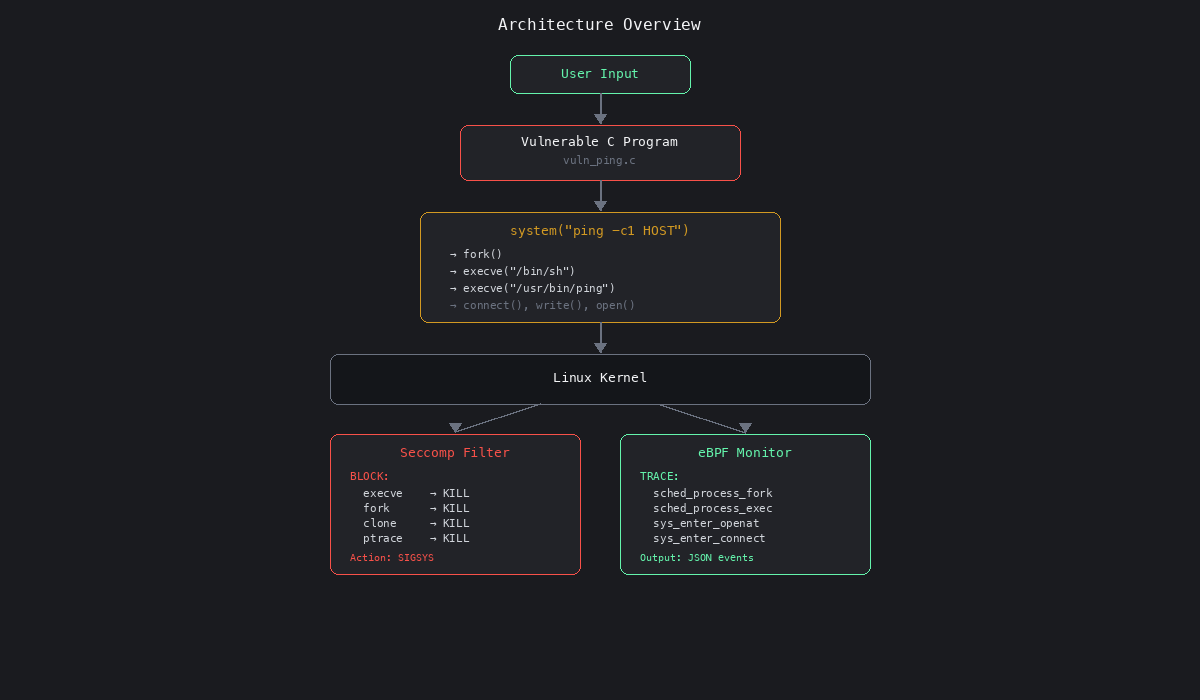
The vulnerable program accepts user input and passes it directly to system(), which spawns /bin/sh. An attacker can inject arbitrary commands. Seccomp blocks this at the kernel level by denying the syscalls that system() requires. eBPF lets us observe the entire attack chain in real time.
Prerequisites
Tested on Ubuntu 22.04+ (requires a Linux kernel with eBPF support).
sudo apt update
sudo apt install -y \
    build-essential \
    libseccomp-dev \
    bpftrace \
    linux-headers-$(uname -r)
Create a working directory:
mkdir -p ~/seccomp-ebpf-lab && cd ~/seccomp-ebpf-lab
Part 1: Vulnerable Network Program
We'll create a small program that accepts a hostname, executes ping, and writes output to disk. The program is intentionally vulnerable — it passes user input directly into a shell command.
Vulnerable Source Code
Create vuln_ping.c:
#define _GNU_SOURCE
#include <stdio.h>
#include <stdlib.h>
#include <string.h>
#include <unistd.h>

#define CMD_BUF 512

static void write_status_file(const char *msg)
{
    FILE *f = fopen("program_status.log", "a");
    if (!f) {
        perror("fopen");
        return;
    }
    fprintf(f, "%s\n", msg);
    fclose(f);
}

int main(int argc, char *argv[])
{
    char cmd[CMD_BUF];

    printf("[*] PID: %d\n", getpid());

    if (argc != 2) {
        fprintf(stderr, "Usage: %s <host>\n", argv[0]);
        return 1;
    }

    const char *host = argv[1];

    /*
     * VULNERABILITY: user input embedded directly into a shell command.
     * system() passes the string to /bin/sh -c, so shell metacharacters
     * like ; | && ` $() are all interpreted.
     */
    snprintf(cmd, sizeof(cmd),
             "ping -c 1 %s > ping_output.txt 2>&1",
             host);

    printf("[*] Running command:\n    %s\n", cmd);
    write_status_file("Executing ping command");

    int rc = system(cmd);

    if (rc == -1) {
        perror("system");
        return 1;
    }

    printf("[*] Done. Exit code: %d\n", WEXITSTATUS(rc));
    return 0;
}
Compile and Run
gcc -Wall -O2 vuln_ping.c -o vuln_ping

# Normal usage
./vuln_ping 8.8.8.8
You should see ping_output.txt and program_status.log created in the current directory.
Part 2: Exploit the Injection
Because system() passes its argument to /bin/sh -c, shell metacharacters are interpreted. The semicolon ; lets an attacker chain arbitrary commands.
Injection Example
./vuln_ping "8.8.8.8; touch /tmp/pwned"
Verify the exploit worked:
ls -la /tmp/pwned
What Happened
The snprintf produced:
ping -c 1 8.8.8.8; touch /tmp/pwned > ping_output.txt 2>&1
The shell interprets ; as a command separator, so it executes:
ping -c 1 8.8.8.8— the legitimate commandtouch /tmp/pwned > ping_output.txt 2>&1— the injected command
This is classic command injection (CWE-78). The attacker can run anything the process user has permission to execute — read files, open reverse shells, install malware.
Syscall Trace
Under the hood, system() triggers this syscall chain:
fork()                    ← create child process
execve("/bin/sh", ...)    ← child runs /bin/sh
fork()                    ← sh forks for ping
execve("/usr/bin/ping")   ← child runs ping
connect()                 ← ping opens ICMP socket
write()                   ← output to ping_output.txt
open("/tmp/pwned")        ← INJECTED: creates the file
Every one of these syscalls is visible to the kernel — which means we can control them with seccomp and observe them with eBPF.
Part 3: Hardening with Seccomp
Seccomp (Secure Computing Mode) is a kernel-level syscall firewall. It lets you define which syscalls a process is allowed to make. Any attempt to call a blocked syscall results in the kernel sending SIGSYS to the process, which kills it immediately.
For our vulnerable program, we block:
| Blocked syscall | Why |
|---|---|
execve |
Prevents spawning /bin/sh or any other binary |
execveat |
Alternate exec path, same risk |
fork |
Prevents creating child processes |
vfork |
Variant of fork |
clone |
Used by threads and process creation |
ptrace |
Prevents debugging/injection into other processes |
With these blocked, system() cannot function — it requires fork() + execve() to work. The kernel will kill the process with SIGSYS before the shell ever runs.
Seccomp-Hardened Program
Create vuln_ping_seccomp.c:
#define _GNU_SOURCE
#include <seccomp.h>
#include <stdio.h>
#include <stdlib.h>
#include <string.h>
#include <unistd.h>

#define CMD_BUF 512

static int enable_seccomp(void)
{
    scmp_filter_ctx ctx;

    /* Default action: ALLOW all syscalls */
    ctx = seccomp_init(SCMP_ACT_ALLOW);
    if (!ctx)
        return -1;

    /* Block dangerous syscalls — process is killed (SIGSYS) on violation */
    seccomp_rule_add(ctx, SCMP_ACT_KILL, SCMP_SYS(execve), 0);
    seccomp_rule_add(ctx, SCMP_ACT_KILL, SCMP_SYS(execveat), 0);
    seccomp_rule_add(ctx, SCMP_ACT_KILL, SCMP_SYS(fork), 0);
    seccomp_rule_add(ctx, SCMP_ACT_KILL, SCMP_SYS(vfork), 0);
    seccomp_rule_add(ctx, SCMP_ACT_KILL, SCMP_SYS(clone), 0);
    seccomp_rule_add(ctx, SCMP_ACT_KILL, SCMP_SYS(ptrace), 0);

    if (seccomp_load(ctx) < 0) {
        seccomp_release(ctx);
        return -1;
    }

    seccomp_release(ctx);
    return 0;
}

int main(int argc, char *argv[])
{
    char cmd[CMD_BUF];

    printf("[*] PID: %d\n", getpid());

    if (argc != 2) {
        fprintf(stderr, "Usage: %s <host>\n", argv[0]);
        return 1;
    }

    snprintf(cmd, sizeof(cmd),
             "ping -c 1 %s > ping_output.txt 2>&1",
             argv[1]);

    if (enable_seccomp() < 0) {
        fprintf(stderr, "[-] Failed to enable seccomp\n");
        return 1;
    }

    printf("[*] Seccomp filter active — execve, fork, clone, ptrace blocked\n");

    /*
     * system() calls fork() then execve("/bin/sh").
     * Both are now blocked by seccomp.
     * The kernel will send SIGSYS and kill this process.
     */
    int rc = system(cmd);

    /* We should never reach this line */
    printf("[*] system() returned: %d\n", rc);
    return 0;
}
Compile and Run
gcc -Wall -O2 vuln_ping_seccomp.c -o vuln_ping_seccomp -lseccomp

# Try to run — the process will be killed by the kernel
./vuln_ping_seccomp 8.8.8.8
Expected result: The process prints Seccomp filter active and then is immediately killed. You'll see Bad system call or the shell reports the process was killed by signal. The ping command never executes, and the injection has no chance to run.
# Verify: the injected file should NOT be created
rm -f /tmp/pwned
./vuln_ping_seccomp "8.8.8.8; touch /tmp/pwned"
ls /tmp/pwned 2>/dev/null || echo "Exploit blocked — /tmp/pwned does not exist"
Why This Works
The seccomp filter is applied before system() is called. When system() internally calls fork(), the kernel checks the seccomp filter, sees that fork is blocked with SCMP_ACT_KILL, and immediately delivers SIGSYS to the process. The execve call to /bin/sh never happens. The injected command never runs.
Important: This is a denylist approach (block specific syscalls). A more secure approach is a default-deny allowlist — block everything except the syscalls your program actually needs. See the eBPF & Seccomp Container Hardening tutorial for generating allowlist profiles from runtime traces.
Part 4: Runtime Monitoring with eBPF
Now we observe the attack at the kernel level using eBPF. We use bpftrace, a high-level eBPF scripting tool that attaches to kernel tracepoints.
What We Monitor
| Tracepoint | What it captures |
|---|---|
sched:sched_process_fork |
Child process creation |
sched:sched_process_exec |
Binary execution (which program runs) |
syscalls:sys_enter_openat |
File access (reads and writes) |
syscalls:sys_enter_connect |
Network connections |
syscalls:sys_enter_write |
Data written to files/sockets |
sched:sched_process_exit |
Process termination |
eBPF Monitor Script
Create proc_audit.bt:
#!/usr/bin/env bpftrace

BEGIN
{
    @tracked[$1] = 1;
    printf("{\"event\":\"start\",\"root_pid\":%d}\n", $1);
}

tracepoint:sched:sched_process_fork
/ @tracked[args->parent_pid] /
{
    @tracked[args->child_pid] = 1;
    printf("{\"event\":\"fork\",\"parent\":%d,\"child\":%d}\n",
           args->parent_pid, args->child_pid);
}

tracepoint:sched:sched_process_exec
/ @tracked[pid] /
{
    printf("{\"event\":\"exec\",\"pid\":%d,\"binary\":\"%s\"}\n",
           pid, str(args->filename));
}

tracepoint:syscalls:sys_enter_openat
/ @tracked[pid] /
{
    printf("{\"event\":\"open\",\"pid\":%d,\"file\":\"%s\"}\n",
           pid, str(args->filename));
}

tracepoint:syscalls:sys_enter_connect
/ @tracked[pid] /
{
    printf("{\"event\":\"connect\",\"pid\":%d}\n", pid);
}

tracepoint:syscalls:sys_enter_write
/ @tracked[pid] /
{
    printf("{\"event\":\"write\",\"pid\":%d,\"bytes\":%d}\n",
           pid, args->count);
}

tracepoint:sched:sched_process_exit
/ @tracked[pid] /
{
    printf("{\"event\":\"exit\",\"pid\":%d}\n", pid);
    delete(@tracked[pid]);
}
Running the Monitoring Lab
This requires two terminals. The workflow is:
Terminal 1 — Start the vulnerable program with a sleep so you have time to attach the monitor:
# Get the PID first by running with a benign input
./vuln_ping 8.8.8.8 &
echo "PID is: $!"
Terminal 2 — Attach the eBPF monitor to the process tree:
chmod +x proc_audit.bt
sudo ./proc_audit.bt <PID>
Terminal 1 — Now run the exploit:
./vuln_ping "8.8.8.8; touch /tmp/pwned"
Example Output
The eBPF monitor captures the full attack chain as JSON events:
{"event":"start","root_pid":4002}
{"event":"fork","parent":4002,"child":4003}
{"event":"exec","pid":4003,"binary":"/bin/sh"}
{"event":"fork","parent":4003,"child":4004}
{"event":"exec","pid":4004,"binary":"/usr/bin/ping"}
{"event":"connect","pid":4004}
{"event":"write","pid":4004,"bytes":64}
{"event":"open","pid":4003,"file":"/tmp/pwned"}
{"event":"exit","pid":4004}
{"event":"exit","pid":4003}
This reveals:
- The program forked and spawned
/bin/sh(thesystem()call) - The shell forked again and ran
/usr/bin/ping - Ping made a network connection and wrote output
- The shell opened
/tmp/pwned— the injected command - Both child processes exited
With the seccomp-hardened version, you'd see the start event and then immediately an exit — the kernel kills the process before any fork or exec happens.
Behavior Comparison
Without Seccomp
vuln_ping
  └── /bin/sh -c "ping -c 1 8.8.8.8; touch /tmp/pwned"
        ├── /usr/bin/ping 8.8.8.8
        └── touch /tmp/pwned          ← INJECTED COMMAND RUNS
Result: Exploit succeeds. Attacker creates arbitrary files.
With Seccomp
vuln_ping_seccomp
  └── system() → fork() → BLOCKED BY SECCOMP (SIGSYS)
Result: Kernel kills the process. No shell. No ping. No exploit.
Key Lessons
1. Command Injection (CWE-78)
Never pass user input into system(), popen(), or any function that invokes a shell. Use execve() with a fixed argument array instead:
/* SAFE: no shell interpretation */
char *args[] = {"/usr/bin/ping", "-c", "1", host, NULL};
execve(args[0], args, NULL);
2. Seccomp Reduces Kernel Attack Surface
Even if your code has vulnerabilities, seccomp constrains the damage. A process that cannot fork, exec, or ptrace is severely limited in what an attacker can do after exploitation. Seccomp is the last line of defense between a bug and a compromise.
3. eBPF Provides Kernel-Level Visibility
eBPF lets you observe process behavior directly from the kernel — no agent processes, no log parsing, no guessing. You see every fork, exec, file open, and network connection in real time. This is the same technology powering:
- Falco — Kubernetes runtime detection (see the Gatekeeper & Falco tutorial)
- Tetragon — Cilium's eBPF enforcement engine
- Container seccomp profiles — Generated from eBPF syscall traces (see the eBPF & Seccomp tutorial)
Security Engineering Pattern
Real-world Linux hardening follows this cycle:
Write code
    ↓
Observe runtime behavior (eBPF)
    ↓
Restrict capabilities (seccomp, capabilities, namespaces)
    ↓
Validate with runtime telemetry (eBPF again)
    ↓
Iterate
The key insight: you can't secure what you can't see. eBPF gives you visibility. Seccomp gives you control. Together, they form the foundation of modern Linux and container security.
Next Steps
- Build a default-deny seccomp profile — Instead of blocking specific syscalls, allow only the ones your program needs. The eBPF & Seccomp Container Hardening tutorial walks through generating profiles from runtime traces.
- Export eBPF events to a SIEM — Pipe the JSON output from
proc_audit.btinto Elasticsearch, Splunk, or Panther for correlation and alerting. - Detect suspicious behavior with Falco — The K8s Runtime Monitoring tutorial shows how to write detection rules for shell spawning, recon tools, and container drift.
- Explore Linux capabilities — Seccomp blocks syscalls; capabilities control kernel privileges. The Linux Capabilities tutorial covers how they complement each other.
- Build a container sandbox — Combine seccomp, capabilities, namespaces, and cgroups to create a minimal container runtime from scratch.
Lab Cleanup
rm -f vuln_ping vuln_ping_seccomp
rm -f ping_output.txt program_status.log
rm -f /tmp/pwned
rm -f proc_audit.bt